Open Badge validators compared: which result can you rely on?
Compare public Open Badge 2.0 and 3.0 validators, issuer pages and libraries, then run a repeatable proof, status, issuer and holder verification workflow.
Verify Open Badge · Oct 2, 2026 · 9 min read
A candidate sends a badge image and asks, "Is it real?" A validator can answer a narrower question. It may extract a credential, fetch a hosted assertion, verify a signature, check withdrawal, or compare a subject identifier with an expected value. Different tools cover different formats and perform different checks. A green result from the wrong tool is not a decision about the person who sent the badge.
This comparison includes public services run by 1EdTech and Badgr, our own 3.0 validator, issuer verification pages, and tools for developers. The purpose is to get you to the right check quickly, then show what you still need to decide yourself. Interfaces and supported proof suites can change: test the specific file before putting any checker into a formal workflow.
Identify the input before choosing a checker
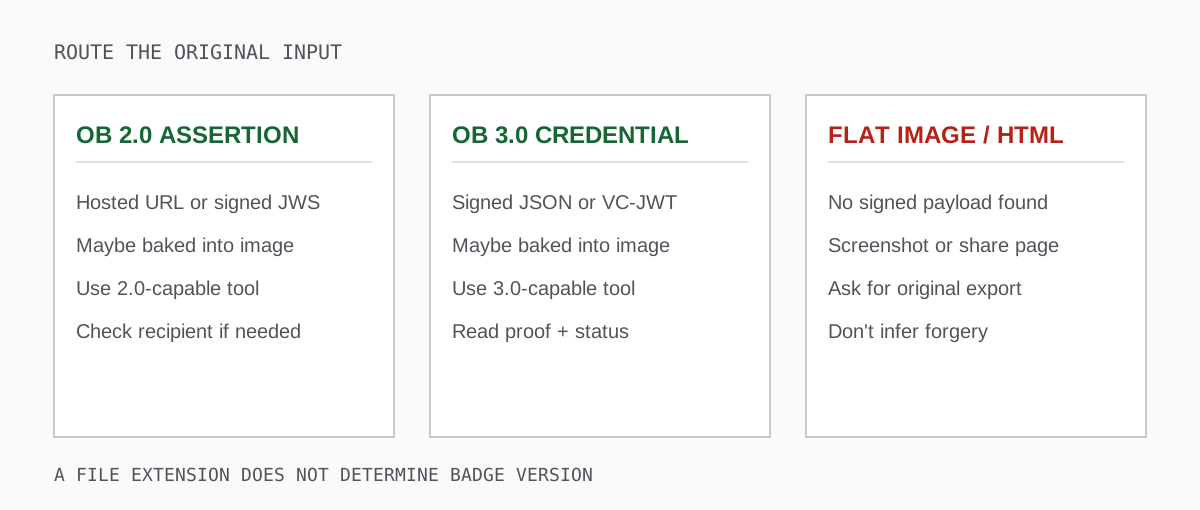
Start with the original download. An Open Badges 2.0 Assertion usually identifies its type and links to a BadgeClass and issuer Profile. It may be hosted or signed as JWS. An Open Badges 3.0 credential follows a verifiable credential model, carrying an achievement in its subject and a proof or signed representation. A PNG or SVG can be baked with either generation's data. A plain image, screenshot, email preview or HTML badge page may contain no machine-verifiable credential at all.
If the issuing page requires a login, a public URL checker cannot fetch a private credential on your behalf. Download an authorised copy through the recipient portal and use a file input if the validator supports it. Do not paste personal data from a credential into multiple unknown websites just to try your luck. For high-impact checks, use an approved local workflow or obtain permission under your organisation's data-handling policy.
A quick version clue is helpful, but read the detected format in the result. A filename such as certificate.png or a vendor logo does not establish version or proof method. Keep an untouched original so you can repeat the check elsewhere if the first tool rejects it.
Public tools, compared by purpose
- 1EdTech 2.0 Validator: a standards-body check for a 2.0 Assertion. Accepts hosted URL, JSON, signed JWS or baked image with an optional expected recipient profile. It is not a 3.0 checker.
- Badgr badgecheck.io: another public route for 2.0 hosted URLs, JSON, JWS and baked images, with optional recipient matching. Its shared validator-core lineage does not give you a fully independent implementation.
- Verify Open Badge: a per-check diagnostic report for a 3.0 original file or directly fetchable credential URL, with supported JSON, JWT and baked formats. It does not certify products or validate a 2.0 Assertion as 3.0.
- Issuer verification page: useful for that supplier's own award records or a recent platform-side change. Ask whether it provides the independently checkable original file rather than only a share URL.
- Custom verifier: appropriate for a controlled integration or audit where you specify supported inputs, profiles and proofs. Your organisation owns URL resolution, cryptographic coverage, privacy and maintenance.
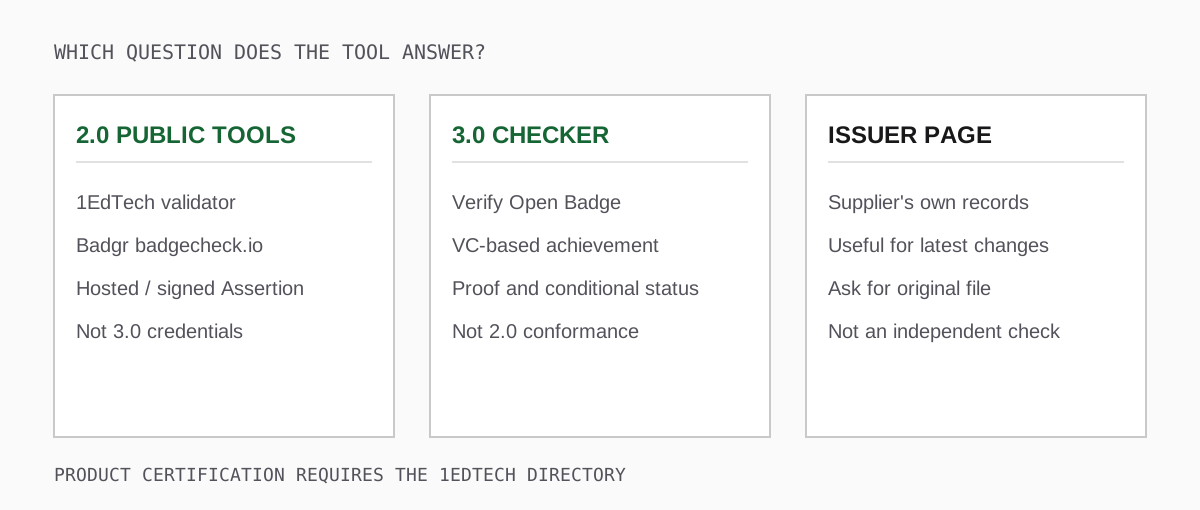
There is no single "best validator" for every badge. A 2.0 checker can correctly reject a 3.0 file as out of scope. A 3.0 checker can correctly tell you that a historical Assertion is unsupported. Neither result by itself says the issuer fabricated a badge. Below is what each route offers and the detail a one-line table cannot capture.
1EdTech's Open Badges 2.0 Validator
The public 1EdTech tool calls itself the "Open Badges 2.0 Validator." Its form accepts a badge-object URL, pasted JSON or signed JWS, and a baked image upload. There is an optional expected Profile JSON field for checking recipient identifiers. For a hosted Assertion, this is an especially useful way to find out whether the issuer's published assertion and linked resources are reachable now.
Its implementation is published as openbadges-validator-core. Read the code and the 2.0 specification if a critical case depends on exactly how a hosted assertion or recipient identifier is checked. The 1EdTech branding does not turn a validation report into a certificate that a product or issuer is certified. The certified product directory is a separate service for product conformance.
Practical test: validate the original 2.0 hosted URL, then repeat with an original baked image. Note whether both input paths lead to the same Assertion and whether the recipient check ran with the identifiers you supplied. A result without an expected recipient must not be described as having established that the applicant earned the badge.
Badgr's Open Badges 2.0 Validator
badgecheck.io identifies itself as a Badgr Open Badges 2.0 Validator, and its current public form offers URL, JSON, JWS and image paths with optional recipient matching. It is a useful alternative for a holder who does not know what to do with a pasted Assertion or baked PNG.
The two public 2.0 services have close validator-core lineage. When they agree, that can confirm you provided an appropriate input and interpreted the same rules. It is not the same as two fully independent cryptographic implementations reaching the same conclusion. If a high-stakes finding is disputed, preserve the input, compare the detailed issue reports, and go to the issuer rather than taking two green icons as a final answer.
A frequent false alarm occurs when the person only has a social-media copy of a badge image. The visible artwork can survive while the baked payload is lost. Ask for the original issuer download or hosted Assertion URL before reporting a verification failure about the underlying award. For other 2.0 operational issues, use the migration guide.
Verify Open Badge for a 3.0 credential
This site's validator is designed for Open Badges 3.0, including supported VC 1.1 and VC 2.0 profiles. Submit the original file or a directly fetchable credential URL. The report separates input detection, baked-data extraction, parsing, context handling, schema and structural checks, proof, status, endorsements, external resources and optional recipient matching. It reports individual outcomes and documented result codes, rather than relying only on a verdict banner.
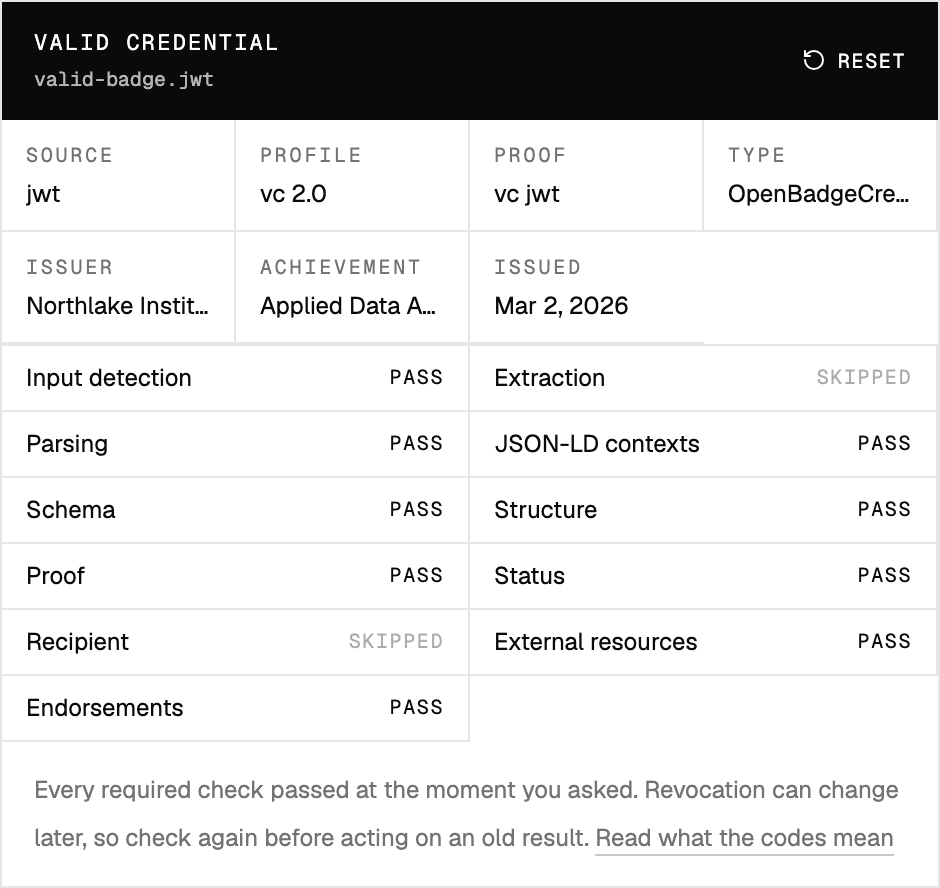
A PASS means that check ran and succeeded. A FAIL means it ran and failed. A SKIPPED check did not establish that property. Extraction is correctly skipped for a non-image file. Recipient matching is not proof of identity when no expected recipient was supplied. For status, read the detail to see whether the credential provided a supported status entry and a list was actually consulted; absence of a status reference is not a confirmed "not revoked."
Try a 3.0 sample from the same account that would issue your production badges. Check the proof mechanism, verification method and credential profile that the report actually names. A supported VC-JWT does not guarantee every JSON-LD Data Integrity cryptosuite is supported. If proof fails, save the exact code, path and message. An unsupported suite, unreachable key and altered signed data demand different next actions.
One honest limit: our validator does not certify products or independently authenticate the real-world organisation named as issuer. It also cannot prove that a forwarded file belongs to the applicant without an expected recipient and a trusted matching process. For exact input examples and how to read the UI, follow the validator walkthrough.
What an issuer verification page knows
An issuer's page can help you find the issuer's current record, a replacement award, or an explanation of why an account no longer displays an achievement. For a hosted 2.0 badge, the issuer-hosted Assertion is central to verification. For a signed 3.0 badge, a share page may only display information; ask for the original signed credential to run an independent check. The page might not expose a downloadable file, even if it prominently says "verified."
Do not equate visiting the issuer's page with checking a signed export independently. A page may be accurate, but it is operated by the same service that issued the badge. Conversely, an independent proof check may miss a recent withdrawal if it could not reach a configured status source. In a contested case, keep both records: the issuer's current view and the independent proof/status report, with times and any differences.
For a programme buying issuing software, ask for a public verification page and a recipient-owned export. If all a holder can share is a hosted URL, the verifier becomes dependent on that vendor's continued operation. If the original credential is downloadable, verify that its named public key and status dependencies will survive termination of the contract.
Developers: separate parsing, proof and policy
A custom verifier needs more than a JSON parser. For a 2.0 implementation, start with openbadges-validator-core and the specification. For 3.0, you will need components for the exact formats and suites you support. Typical building blocks include jsonld.js for JSON-LD work, jsonld-signatures with matching cryptosuite packages for relevant Data Integrity proofs, jose for supported JWT/JWS verification, and Ajv for JSON Schema checks. These are ingredients, not a complete badge verifier by themselves.
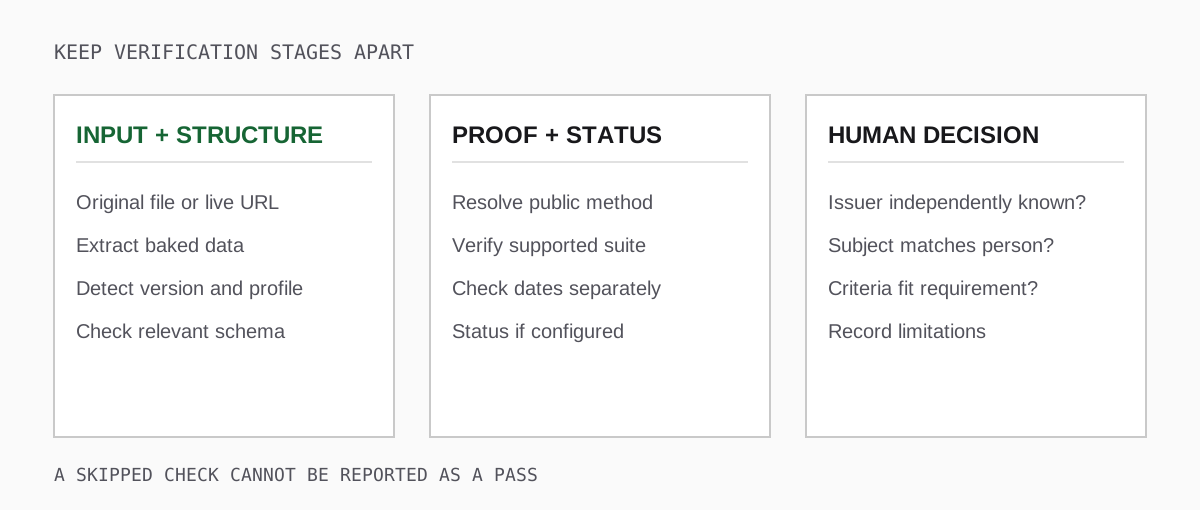
Give the pipeline distinct outcomes for unsupported, unreachable, invalid and not applicable. A timeout when fetching a public key does not demonstrate a bad signature. A credential with no configured status reference cannot yield a live revocation result. An issuer-supplied URL may point to a large, slow or untrusted resource, so set fetch limits, timeouts, redirect policies and safe resolution rules. Treat remote contexts and key documents as security-sensitive inputs rather than harmless documentation links.
Pin test fixtures for each supported proof and profile. Include an altered copy, a missing verification method, an expired sample, a revoked sample with a reachable status source, and a copy with an unavailable status service. Add an original baked image and a recompressed image with missing payload. After a dependency update or key rotation, rerun the fixtures. If you cannot say which version, proof suites and status types you support, you cannot correctly interpret an unsupported result.
Make the check reproducible when it matters
Suppose a hiring team receives a credential showing completion of a safety module. Their verification record should distinguish seven facts: the file they checked; its badge version and VC profile where applicable; whether a proof was tested; whether status was checked at a particular time; whether the issuer was confirmed outside the credential; how the subject was tied to the candidate; and whether the actual criteria meet the role's requirements.
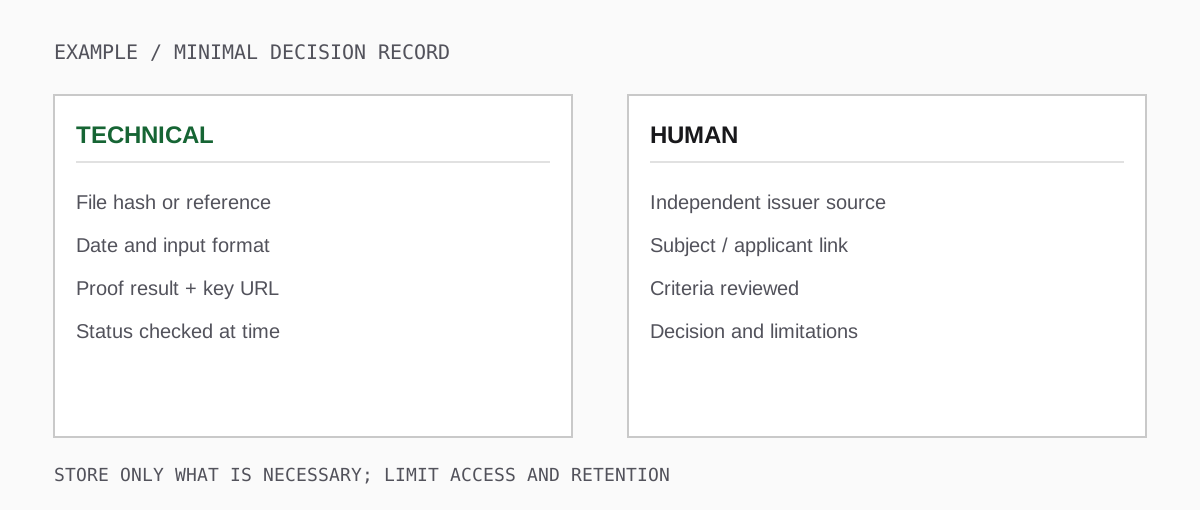
The last three facts are not usually established by a public validator. The issuer could be a real organisation whose qualification you do not recognise. A correctly signed badge could describe another person's award. A valid attendance badge may not meet a practical-assessment requirement. Keep those limitations visible when quoting a result to a manager or compliance team.
Handle the record with restraint: store the file only where needed, restrict evidence containing personal data, and record a checksum or approved internal reference when retaining the full credential is unnecessary. A validator report generated last month cannot substitute for checking a live status source today if today's eligibility depends on withdrawal.
Triage a result without inventing certainty
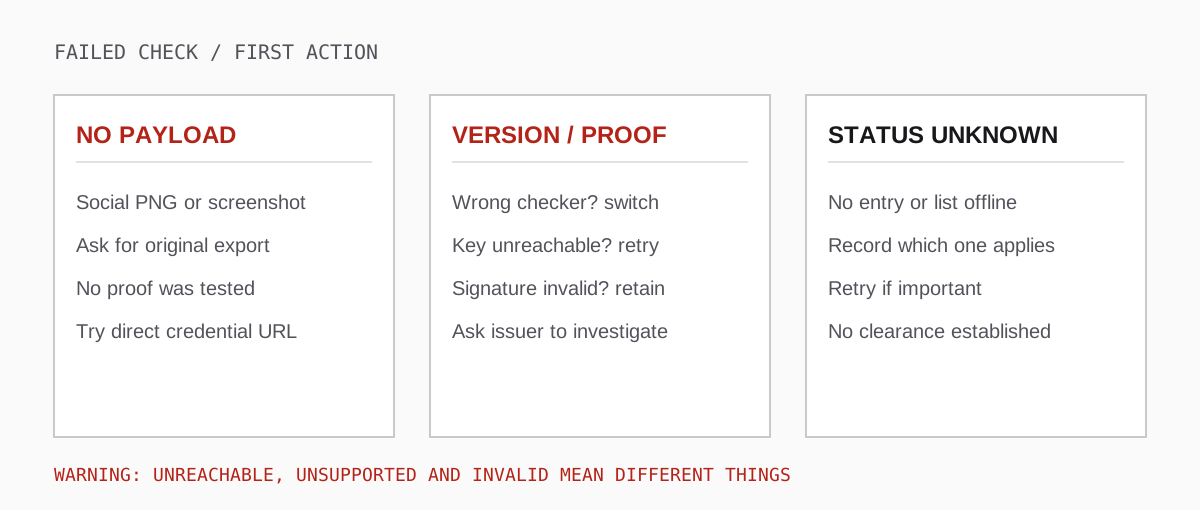
- No payload in an image: request the original downloaded PNG/SVG or the separate signed JSON/JWT; a screenshot is not a failed signature.
- 2.0 input in a 3.0 tool, or vice versa: use a validator for the detected version. Record "unsupported here" rather than "counterfeit."
- Unreachable assertion or key URL: keep the original and retry once; contact the issuer through a source you located independently. Report what was unavailable.
- Proof reported invalid: preserve the exact bytes and error details. Ask the issuer to investigate; do not edit the file until it passes.
- Status absent or unreachable: report current withdrawal status as unconfirmed. Escalate if the decision requires a live check.
- Recipient or criteria unclear: resolve with the issuer or programme owner. Re-running the signature check cannot answer a human identity or assessment-policy question.
If you are buying software rather than reviewing a particular award, use the 1EdTech certified product directory and independently verify an example export. If you are reviewing one person's badge, select a validator for its version and read each check. Both jobs matter, and neither tool substitutes for the other. For the full receiver workflow, see how to validate an Open Badge.